
 Shortsbrief → first cut
A short film from a brief, finished on a real timeline.
Tell Shorts what you're making — the goal, the audience, the style, the length — drop in clips, photos, audio, text or PDFs, and get a structured first cut with titles, captions and pacing. Then refine every frame on a proper multitrack timeline.
A first cut in seconds, not a blank timeline.
Shorts assembles your media into a paced edit with title overlays, captions and a call to action. Everything the auto-director builds is yours to change — trim, split, reorder, restyle — and every change is undoable.
What it does
From idea to exported video without leaving one app.
Import almost anything, direct the edit in plain language, export with confidence.
Brief-driven first cut
Pick 9:16, 1:1 or 16:9, describe the goal, audience, style and duration, and get a structured, editable starting point.
A real editor underneath
Multitrack visual and audio timeline with trim, split, duplicate, reorder, captions, transitions, scale and volume.
A director that previews first
Ask for changes in plain language; the project-aware Studio Assistant shows each proposed edit before it touches your timeline, and keeps it undoable.
Import almost anything
Video, photos, audio, plain text, RTF and PDF — text becomes styled title cards, PDFs contribute their first page.
Export that doesn't fail halfway
A strict preflight checks sources, trim ranges and free storage before rendering H.264 MP4 at 24/30/60 fps.
Recoverable projects
Versioned local projects with atomic saves, a last-known-good backup and corrupt-file quarantine.
Inside the app
The actual editing surfaces.
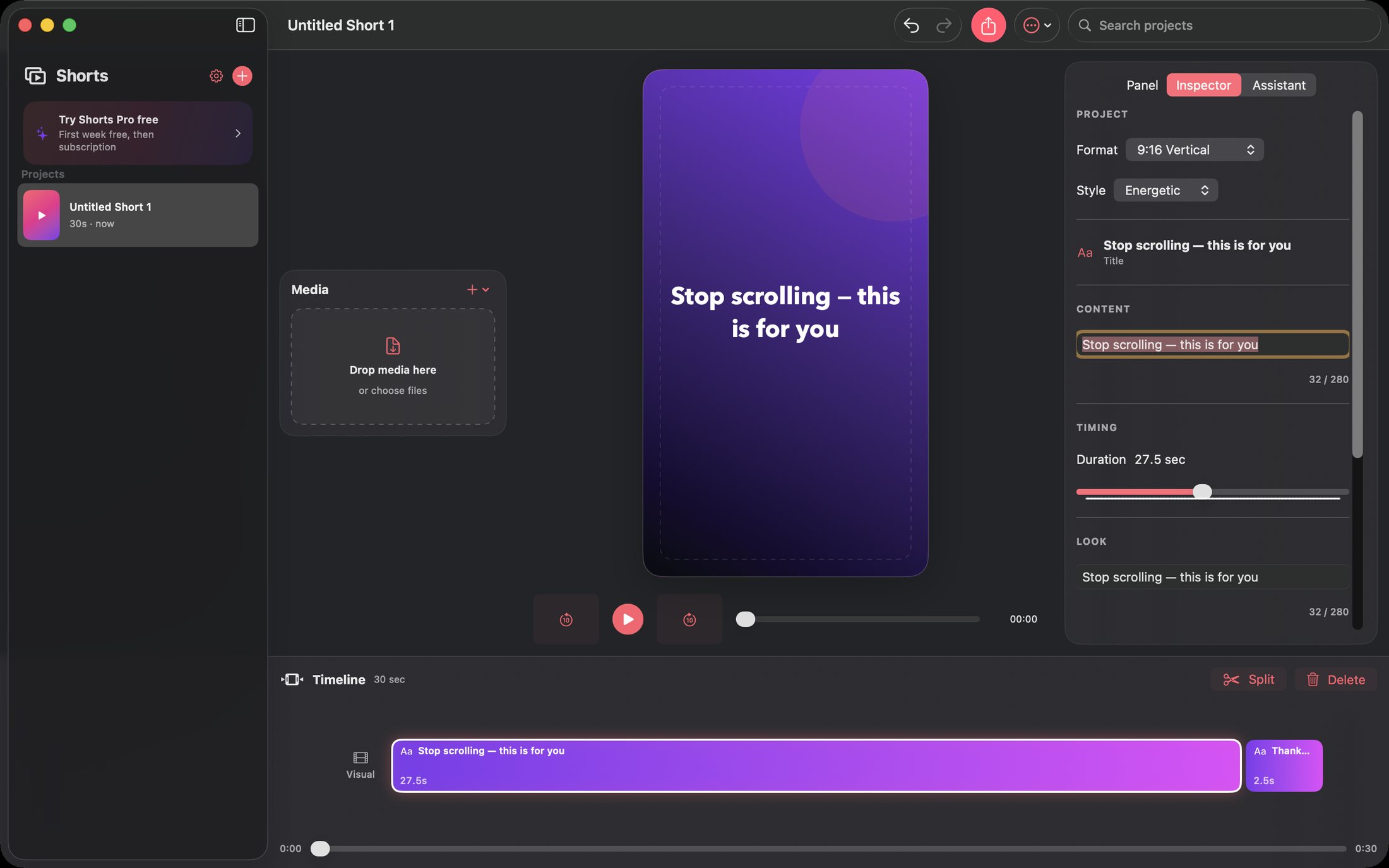
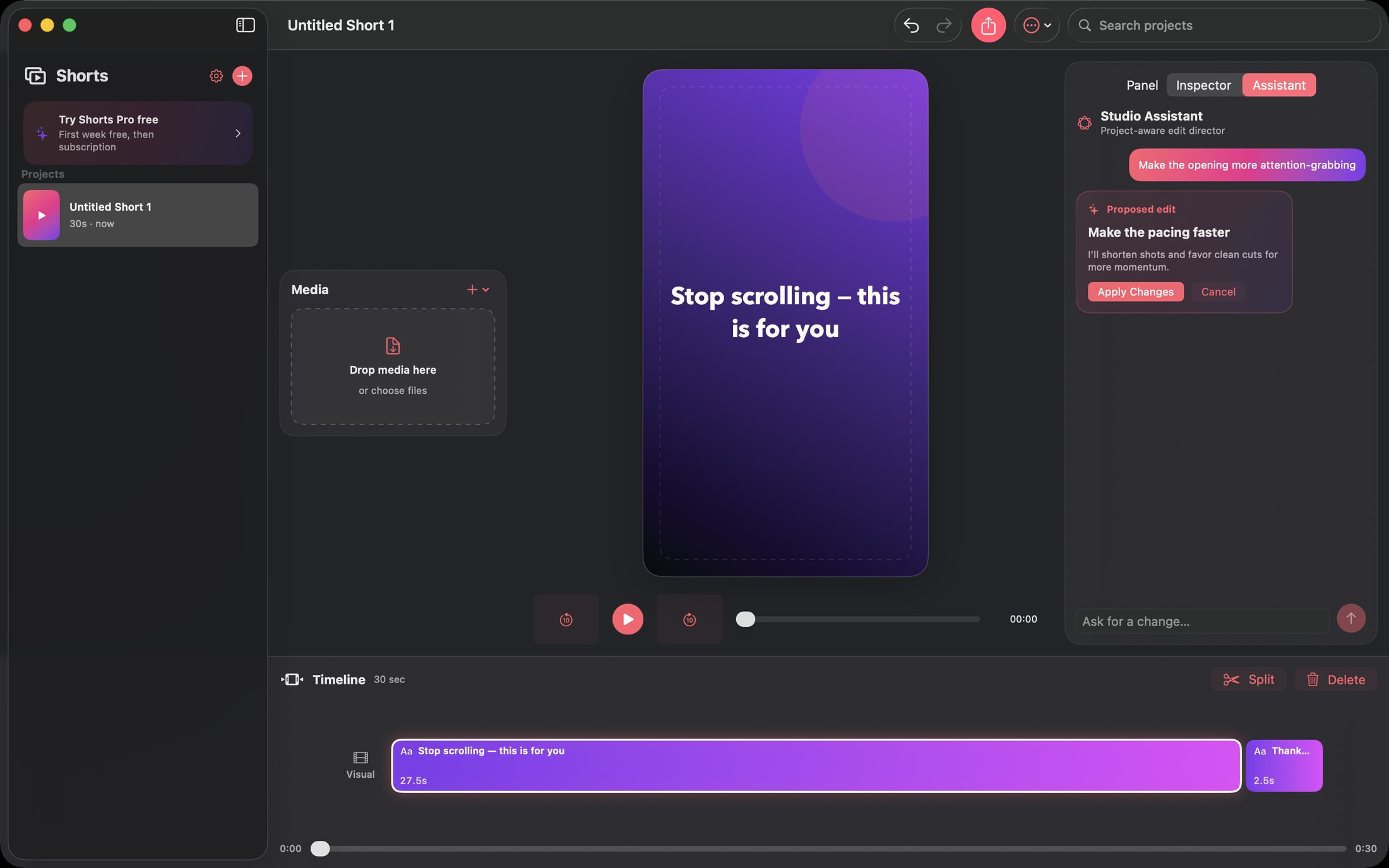
The vertical editor with its inspector, and the Studio Assistant proposing an edit before applying it.
The editor
Preview, inspector and multitrack timeline. Format, style, title, content and timing are all directly editable.
The Studio Assistant
A proposed edit — with its reasoning — waiting for your Apply. Nothing changes without you.
How to use Shorts
Make a short in six steps.
The fastest path from footage to a finished vertical video.
Describe the brief
Goal, audience, style, duration, filename and call to action — the brief drives the first cut.
Drop in your media
Clips, photos, audio, text and PDFs are copied into the project so it stays intact.
Review the first cut
Titles, captions and pacing are already placed. Play it once before touching anything.
Refine on the timeline
Trim, split, reorder, restyle and mix audio on the multitrack timeline.
Direct with words
Ask the assistant for a faster pace or a punchier hook — it previews every change first.
Export with preflight
Pick Full HD or HD and a frame rate; preflight verifies everything before the render starts.
Private by design
Local-first, with nothing uploaded.
Projects, media copies, assistant messages and exports all live on your Mac. On supported hardware the assistant uses Apple's on-device language model; everywhere else a built-in offline edit director understands the same requests.
- On-device assistant with a deterministic offline fallback
- Media copied into the project so edits survive moved source files
- Atomic saves with last-known-good backup and quarantine
- Accurate preview with source audio, music and trim-true seeking
- Strict export preflight for sources, trims, storage and cancellation
- No account, no cloud and no tracking of any kind
- Works on
- macOS 14+ (Apple Silicon and Intel)
- Formats
- 9:16 vertical, 1:1 square, 16:9 wide
- Imports
- Video, photos, audio, text, RTF, PDF
- Export
- H.264 MP4, Full HD/HD, 24/30/60 fps
- Privacy
- Local-first; media is never uploaded
Support the project
Support the project and download Shorts.
Shorts removes the blank-timeline problem: a real first cut in seconds, a real editor to finish it, and a real export you can post anywhere. Donate what you like to support the project and download the full app straight away. The download is the complete, fully activated app — every feature included. Each download link works once.
ShortsNative MacStop scrolling — start shipping.
Get the software
Support the project and download a build.
Donate what you like, pick your product and your computer type, and download it right after checkout. You always receive the complete, fully activated app. Each download link works once and expires after a while.